 ClipsPal
Video editor with auto captions
ClipsPal transcribes recorded talking-head video and adds timed captions. Review the edit in a timeline you can refine before export.
Transcribe spoken video
Start with a recorded talking-head video and its spoken words.
Review timed captions
See subtitles alongside the video as you refine the edit.
Keep editing in context
Work on captions and cuts in the same video project.
See subtitles with the rest of the edit.
Review the caption treatment beside the video, cuts, zoom-ins and visuals.
Failed takes and silences
We just added two amazing features that were requested by many customers.
failed takeFirst one, you can localize prices.
First is pricing localization and secondly is Android support.
In the whole video: 38 failed takes and 111 silences cut, 15:35 of footage → 5:40.
Zoom-ins
Subtitles
Visuals
Refine captions in the video timeline.
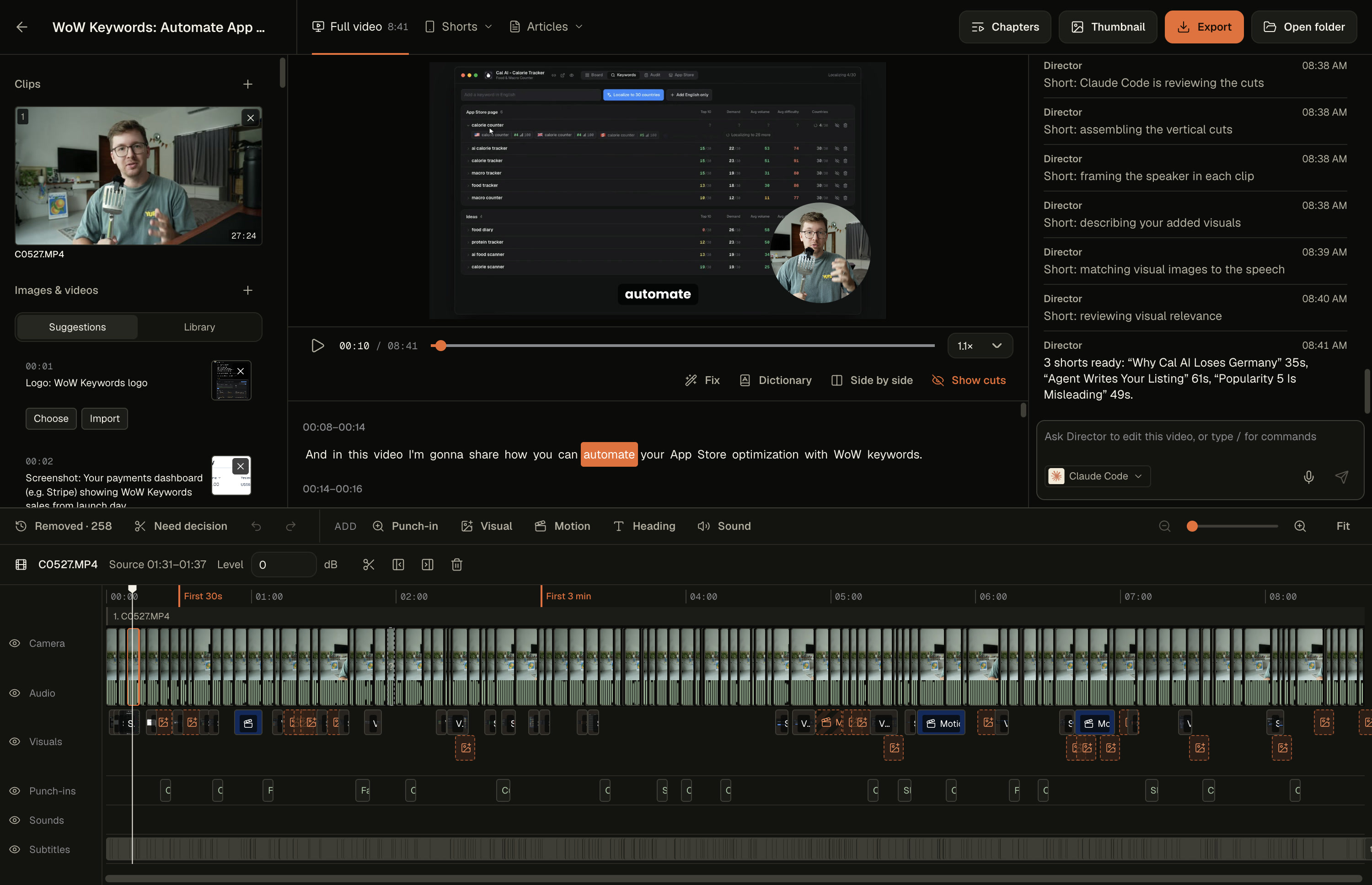
Make the finishing edits.
- ✓Drag, trim and split every clip
- ✓Restore any cut. Every edit can be undone
- ✓Add zoom-ins, visuals, motion slides, headings and sounds
- ✓Fix words in the transcript and subtitles
- ✓Make thumbnails, chapters and articles
- ✓Export MP4 with subtitles and SRT
Get lifetime access.
Edit your videos in minutes.
Lifetime access. No subscription.
17 licenses left at $59. Then $69.
Up $10 every 20 licenses.

Trusted by 23 creators

Everything in ClipsPal
- One-click auto edit
- Cuts failed takes and silences
- Subtitles in 40 languages
- Zoom-ins, visuals and sounds
- Motion slides
- Record voice or screen
- Director: edit by asking
- Articles from your video
- YouTube chapters
- Thumbnail editor
- MCP for your AI agents
- Shorts for


- Export to







Pay securely through
Questions
AI and privacy
Can ClipsPal add captions to a recorded video?+
Yes. ClipsPal transcribes recorded talking-head video and adds timed captions you can review in the editor.
Can I edit subtitle files in my browser?+
Yes. Use the subtitle editor to edit SRT or VTT files and preview their timing.
Which AI do I need?+
Any one of these: Claude Code with a Claude Pro or Max plan, Codex with a ChatGPT plan, OpenCode with any provider you connect, Gemini with a Google account, Cursor with a Cursor account, Grok with SuperGrok or X Premium+, or a free local model ClipsPal downloads for you. Nothing is billed per video.
Does my footage get uploaded?+
No. Video and audio stay on your computer, and so does transcription. Only the transcript goes to the AI you picked. With the local model, nothing leaves your computer.
What are motion slides?+
Animated slides the AI designs for the words you select.
Can my AI agent use ClipsPal?+
Yes. ClipsPal includes an MCP server. Claude Code, Codex, OpenCode, Cursor, Grok, Claude Desktop, Windsurf or any MCP client can open your videos, cut them, make shorts, chapters and articles, and export. Add it from Settings → Integrations.
Which languages does it understand?+
40 spoken languages, including English, Spanish, Hindi, Portuguese, French, German, Japanese, Chinese, Korean and Arabic.
Your computer
Can I generate captions without editing a full video?+
Use the auto caption generator to create timed captions from a video or audio file and download SRT or VTT.
What computer do I need?+
macOS 14 or later on a Mac with Apple Silicon or Intel, or Windows 11 on an Intel or AMD x64 computer. Windows is an unsigned beta; check the download page for availability.
What differs on Intel Macs?+
Everything works, including screen and camera recording and background removal. Transcription uses the same local Whisper model as Windows, downloaded once on first use, with lower accuracy than on Apple Silicon.
What differs on Windows?+
Import, edit, export, AI editing and local voice input are included. Windows bundles a local Whisper model, with lower transcription accuracy than Mac. No model download is needed on first run. Native screen and camera recording and background removal are Mac-only. The Windows beta is unsigned and may trigger SmartScreen.
Can I record my screen?+
Yes, on Mac: your screen with your camera in the corner, or just your voice. On Windows, import files or record audio.
What kind of videos is it for?+
Talking-head videos: YouTube, courses, founder updates, product walkthroughs. Anything you record in several takes.
How many computers can I use?+
2. Move the license from Settings anytime.
Buying
Can I download it before buying?+
Yes. Download ClipsPal anytime; editing starts once you enter a license.
Is it a subscription?+
No. It’s a one-time payment for lifetime access to ClipsPal. Your version is yours to keep, with updates forever included.
Are future updates included?+
Yes. Your license includes updates forever.
Can I finish the edit in another app?+
Yes. Export the timeline to Premiere Pro or DaVinci Resolve.